DeepSeek API Pricing: Avoid Costly Mistakes With V4.1-Flash & V4-Pro
DeepSeek API pricing depends on three factors: the model you choose, the type of tokens it processes, and whether the request runs during peak or off-peak hours. As of October 2026, DeepSeek V4.1-Flash costs $0.30 per million cache-miss input tokens and $1.20 per million output tokens during peak hours. Off-peak DeepSeek API pricing is half: $0.15 for input and $0.60 for output. DeepSeek V4-Pro costs $1.32 per million cache-miss input tokens and $3.96 per million output tokens at peak; off-peak, it costs $0.66 and $1.98 respectively.
DeepSeek API pricing drew more attention after the company updated billing for its V4 models in August 2026. Under the new DeepSeek API pricing system, rates are no longer the same throughout the day: DeepSeek now uses peak and off-peak pricing, so an identical request may cost more or less depending on when it runs.
If you’re developing an AI app, chatbot, coding assistant, or automated workflow, it pays to understand DeepSeek API pricing. Even a small change in token usage can make a noticeable difference once your system handles millions of requests.
This guide breaks DeepSeek API pricing down into straightforward terms. It covers token billing, the difference between cache-hit and cache-miss input, peak hours in India, and ways to estimate your monthly bill under the latest DeepSeek API pricing.
For the full timeline of the recent rate changes, read our guide to the DeepSeek AI price increase.
1. What Is DeepSeek API Pricing?
DeepSeek API pricing is what you pay when you access DeepSeek’s AI models through an API.
An API lets developers connect DeepSeek models to apps, websites, chatbots, automation workflows, and internal business tools. Rather than using the DeepSeek website manually, an application sends requests through code and receives AI-generated responses.
DeepSeek calculates API usage in tokens, and DeepSeek API pricing changes based on the model, token type, and billing period.
What is a token?
A token is a small unit of text. Depending on the text, it might be:
- A full word
- Part of a word
- A number
- Punctuation
- A character or group of characters
For instance, a sentence such as “DeepSeek API pricing is changing” may be broken into several tokens. AI models process these token units rather than reading text exactly as people do.
What are input tokens?
Input tokens are the text you provide to DeepSeek. For example, if you ask DeepSeek, “Summarize this article in 100 words,” your question, instructions, and any document you attach are input tokens under DeepSeek API pricing.
What are output tokens?
Output tokens are the words and other text DeepSeek produces in its response. If DeepSeek writes a 500-word answer, that response is made up of output tokens. Under DeepSeek API pricing, output tokens generally cost more than input tokens because generating a response requires additional computing resources.
Why DeepSeek API pricing matters
AI usage costs can add up quickly. A chatbot answering thousands of customer questions daily can use millions of tokens. A coding assistant processing large codebases can consume large amounts of input context. A content automation tool generating hundreds of articles can accumulate output-token costs, while a data-extraction system may use both high input and output volumes. Without tracking token usage, your DeepSeek API pricing bill can grow beyond what you planned.
2. How DeepSeek Token Billing Works
DeepSeek calculates your API bill according to how many tokens the model processes, and DeepSeek API pricing applies separately to each token type.
Billing depends on model choice
DeepSeek has models designed for different types of work. V4.1-Flash is the lower-cost, faster model for everyday tasks. V4-Pro is the premium model for complex reasoning, coding agents, and demanding tasks. Picking a model that fits the task is one of the simplest ways to manage DeepSeek API costs.
Billing depends on token type
DeepSeek separates billing into:
- Cache-hit input tokens
- Cache-miss input tokens
- Output tokens
Under DeepSeek API pricing, cache-hit input costs less because DeepSeek can reuse text it has processed before. Cache-miss input is more expensive because the model needs to process new text. Output tokens typically cost more because the model must generate the response, rather than simply process the input.
Billing depends on time of use
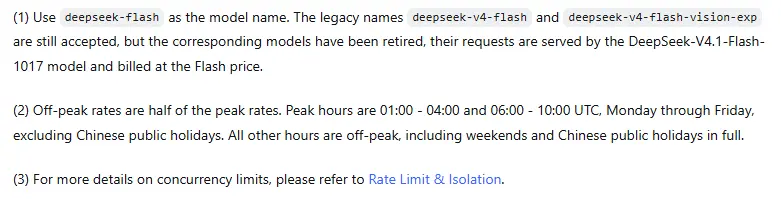
DeepSeek uses peak and off-peak pricing. Peak hours cost more; off-peak hours cost half of peak rates. Weekends and Chinese public holidays are off-peak. As a result, the same request can have a different price under DeepSeek API pricing depending on when it is processed.
3. Current DeepSeek API Pricing
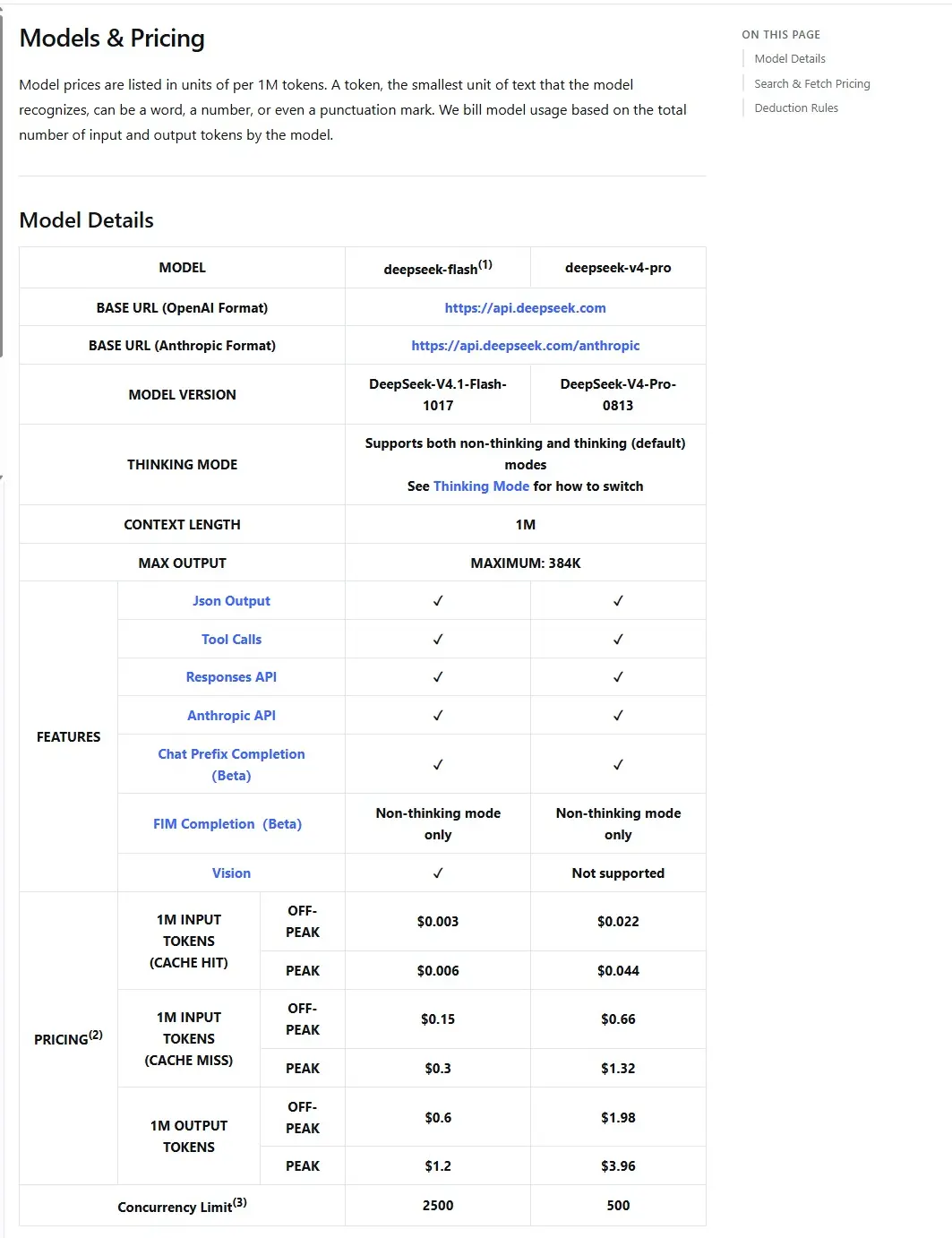
The table below lists DeepSeek’s published rates per one million tokens, as described in the pricing information for October 2026. This is the core of current DeepSeek API pricing.
| Model | API model name | Billing period | Cache-hit input | Cache-miss input | Output |
|---|---|---|---|---|---|
| DeepSeek V4.1-Flash | deepseek-flash | Peak | $0.006 | $0.30 | $1.20 |
| DeepSeek V4.1-Flash | deepseek-flash | Off-peak | $0.003 | $0.15 | $0.60 |
| DeepSeek V4-Pro | deepseek-v4-pro | Peak | $0.044 | $1.32 | $3.96 |
| DeepSeek V4-Pro | deepseek-v4-pro | Off-peak | $0.022 | $0.66 | $1.98 |
DeepSeek also charges $0.75 per 1,000 successful requests for its Search and Fetch API services, according to the supplied pricing information.
4. DeepSeek V4.1-Flash Pricing
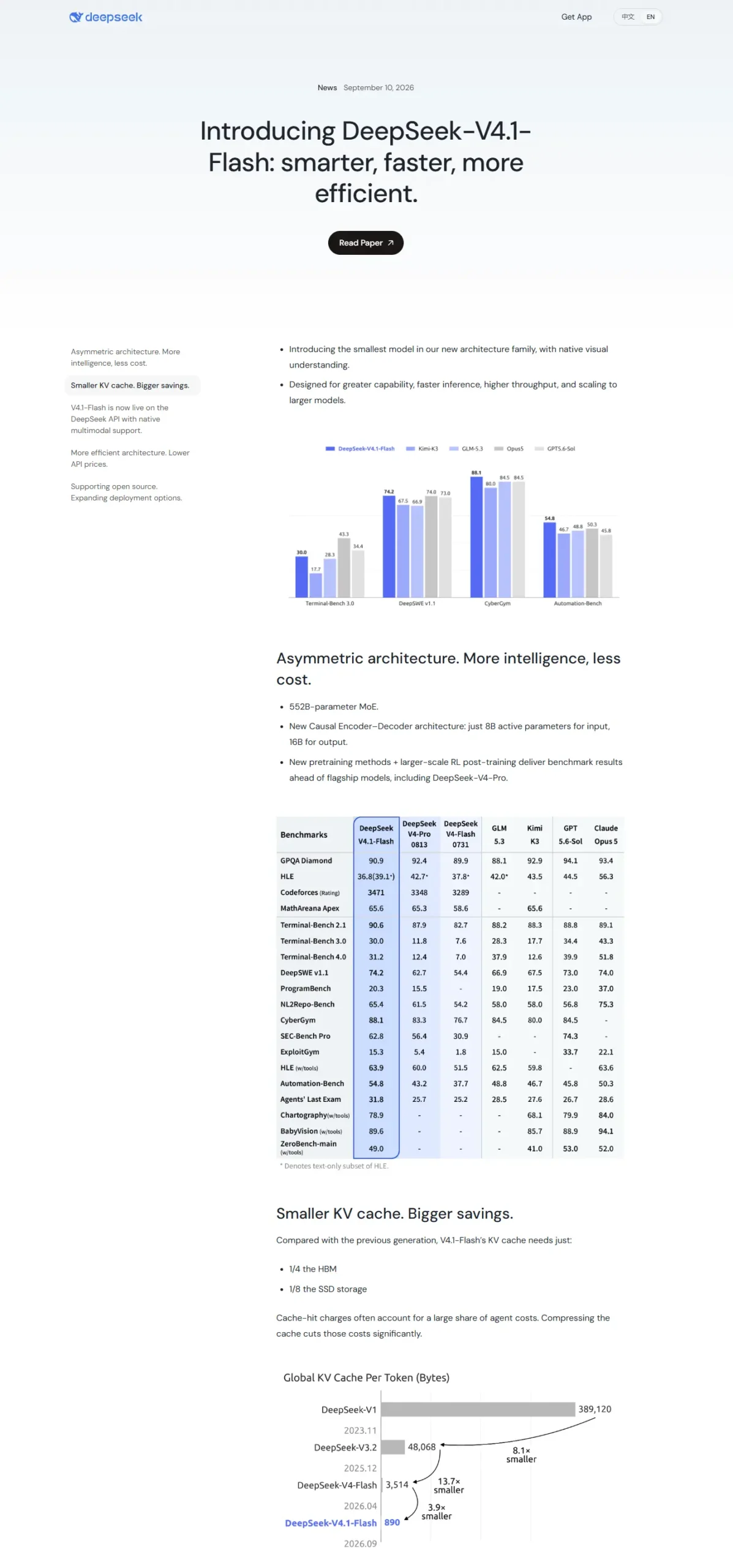
DeepSeek V4.1-Flash is the company’s lower-cost model for everyday workloads. Its API model name is deepseek-flash, and it is the most affordable option in current DeepSeek API pricing.
DeepSeek introduced V4.1-Flash on September 10, 2026, presenting it as a faster and more efficient option for common AI tasks.
V4.1-Flash peak pricing
- Cache-hit input: $0.006 per million tokens
- Cache-miss input: $0.30 per million tokens
- Output: $1.20 per million tokens
V4.1-Flash off-peak pricing
- Cache-hit input: $0.003 per million tokens
- Cache-miss input: $0.15 per million tokens
- Output: $0.60 per million tokens
V4.1-Flash key specifications
- Context window: 1 million tokens
- Maximum output: 384,000 tokens
- Native multimodal support: text and images
- Concurrency limit: 2,500 requests
Best use cases for V4.1-Flash
Use V4.1-Flash for:
- Chatbots
- Customer-support automation
- Content drafting
- Summarization
- Translation
- Data extraction
- Basic coding help
- Document analysis
- High-volume production workloads
Who should use V4.1-Flash?
V4.1-Flash is best for startups, small businesses, and developers who want strong AI performance at a lower cost under DeepSeek API pricing. It is also a good choice for apps that process many requests daily. If your task does not require deep multi-step reasoning, V4.1-Flash will usually be the most cost-effective option in DeepSeek API pricing.
5. DeepSeek V4-Pro Pricing
DeepSeek V4-Pro is the company’s premium model. It uses the API model name deepseek-v4-pro. Under DeepSeek API pricing, V4-Pro targets more demanding work, including coding agents, complex reasoning, and autonomous tasks that involve multiple steps.
V4-Pro peak pricing
- Cache-hit input: $0.044 per million tokens
- Cache-miss input: $1.32 per million tokens
- Output: $3.96 per million tokens
V4-Pro off-peak pricing
- Cache-hit input: $0.022 per million tokens
- Cache-miss input: $0.66 per million tokens
- Output: $1.98 per million tokens
V4-Pro key specifications
- Concurrency limit: 500 requests
- Thinking and non-thinking modes
- Thinking effort levels: low, high, and max
- Designed for complex reasoning and agent workflows
Best use cases for V4-Pro
Use V4-Pro for:
- Complex coding tasks
- Multi-step planning
- Advanced AI agents
- Long-context analysis
- Difficult research workflows
- High-stakes decision support
- Tasks where accuracy matters more than cost
Who should use V4-Pro?
V4-Pro is best for development teams, agencies, and businesses that need stronger reasoning and can justify the higher cost under DeepSeek API pricing. If V4.1-Flash can complete your task accurately, it will usually be the better financial choice.
6. Cache-Hit vs Cache-Miss Input Pricing
Learning how caching affects prices is a straightforward way to lower your DeepSeek API pricing bill.
What is cache-hit input?
A cache-hit occurs when DeepSeek can reuse input it has already processed. For example, a chatbot may send the same lengthy system prompt with every request. DeepSeek may be able to recognize and reuse that repeated prompt. Since the model does not have to process that text from scratch again, cached input is considerably cheaper under DeepSeek API pricing.
What is cache-miss input?
A cache-miss happens when the input contains text DeepSeek has not already processed and cannot reuse from the cache. This may include:
- A new user question
- A new document
- A new code file
- A new conversation context
- A new image or attachment
Cache-miss input costs more under DeepSeek API pricing because the model must process the new material.
Cache pricing example
Suppose your chatbot uses a 10,000-token system prompt. If that prompt is cached, at the listed V4.1-Flash peak rate you may pay about $0.00006 for those 10,000 cached input tokens, rather than $0.003 for 10,000 cache-miss input tokens. Actual cache behavior depends on the API and request pattern.
How to get more cache hits
- Keep system prompts consistent from request to request.
- Only change instructions when you actually need to.
- Reuse document context when it makes sense.
- Structure conversations to keep repeated context stable.
- Avoid sending essentially the same prompt with small wording changes.
7. DeepSeek Peak and Off-Peak Hours
Peak and off-peak rates are a key part of how DeepSeek API pricing is calculated.
Peak hours
According to the supplied pricing schedule, DeepSeek’s peak hours are:
- 01:00–04:00 UTC
- 06:00–10:00 UTC
These hours apply Monday through Friday, excluding Chinese public holidays.
Off-peak hours
All other hours are off-peak, including:
- Evenings and nights outside the peak windows
- Saturdays
- Sundays
- Chinese public holidays
Off-peak discount
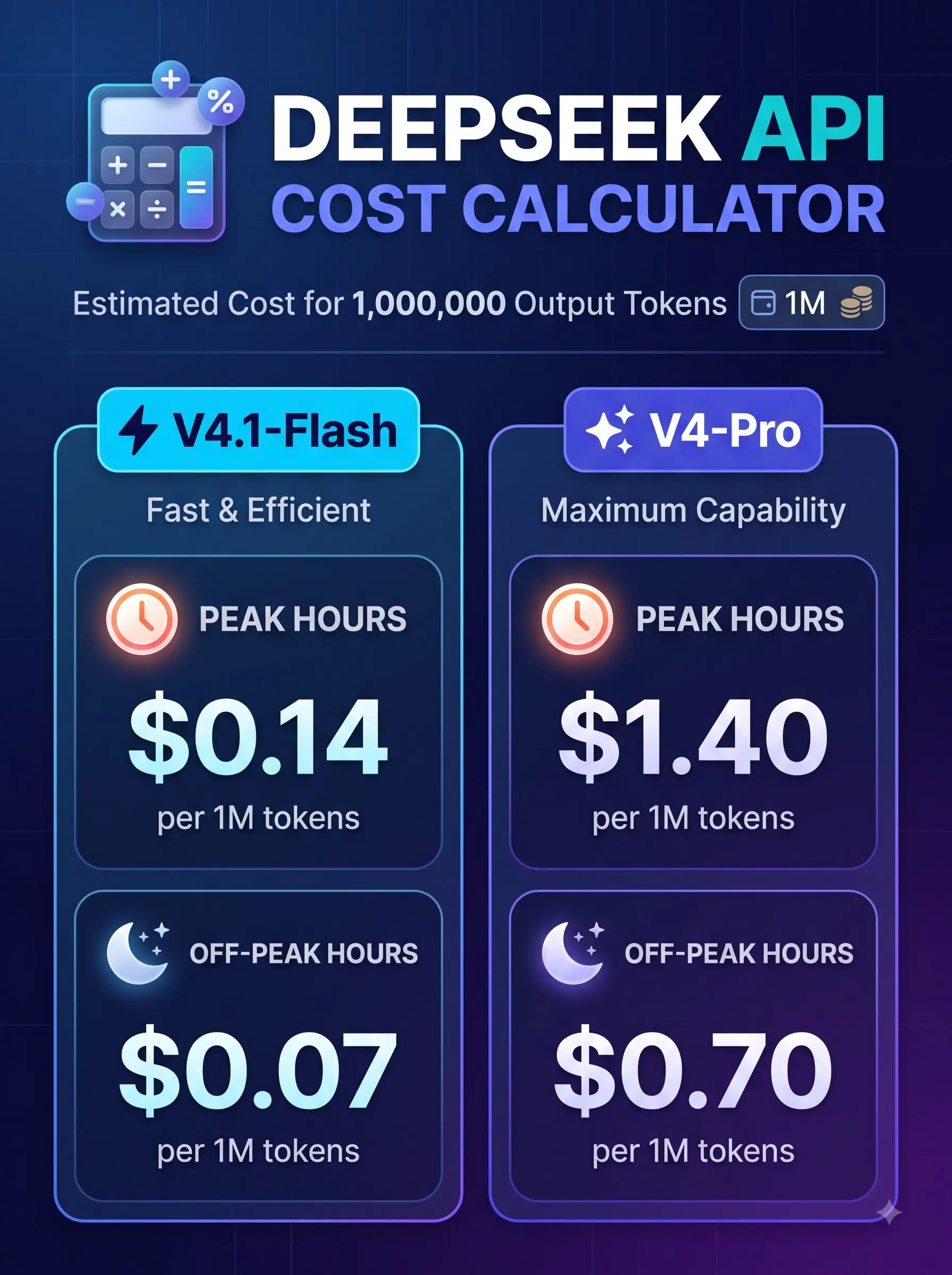
Off-peak pricing is 50% lower than peak pricing. For example, V4.1-Flash output costs $1.20 at peak and $0.60 off-peak. V4-Pro output costs $3.96 at peak and $1.98 off-peak. Scheduling tasks that do not need an immediate response for off-peak hours can reduce eligible output-token costs by half under DeepSeek API pricing.
8. DeepSeek Peak Hours in IST
For developers in India, DeepSeek’s peak windows mostly fall within the daytime.
| UTC window | Approximate IST timing | Pricing |
|---|---|---|
| 01:00–04:00 UTC | 6:30 AM–9:30 AM IST | Peak |
| 06:00–10:00 UTC | 11:30 AM–3:30 PM IST | Peak |
| All other weekday hours | Remaining hours | Off-peak |
| Saturday and Sunday | All day | Off-peak |
What Indian developers should do
If you can choose when jobs run, try not to schedule large batch tasks during these windows:
- 6:30 AM–9:30 AM IST
- 11:30 AM–3:30 PM IST
Instead, schedule them after 3:30 PM IST, in the evening, overnight, or on weekends to benefit from lower DeepSeek API pricing.
Examples of flexible jobs
These jobs can often wait until off-peak hours:
- Bulk content generation
- Document summarization
- Data extraction
- Report generation
- Database cleaning
- Large-scale translation
- Non-urgent coding tasks
- Background automation
What should run during peak hours?
Reserve peak-hour processing for tasks that need a real-time response, such as live customer support, real-time chat, interactive coding assistance, and time-sensitive business workflows.
9. DeepSeek API Cost Calculator
You can estimate DeepSeek API pricing with a simple calculation.
Output cost formula
Output cost = (output tokens ÷ 1,000,000) × output price per million tokens.
Example 1: V4.1-Flash at peak
If you generate 10 million output tokens:
- 10,000,000 ÷ 1,000,000 = 10
- 10 × $1.20 = $12
Your estimated output cost is $12 under DeepSeek API pricing.
Example 2: V4.1-Flash off-peak
If you generate 10 million output tokens off-peak: 10 × $0.60 = $6. Your estimated output cost is $6.
Example 3: V4-Pro at peak
If you generate 10 million output tokens using V4-Pro: 10 × $3.96 = $39.60. Your estimated output cost is $39.60.
Example 4: V4-Pro off-peak
If you generate 10 million output tokens using V4-Pro off-peak: 10 × $1.98 = $19.80. Your estimated output cost is $19.80.
10. Monthly Cost Examples
The examples below cover output tokens only. Your real DeepSeek API pricing bill may also include regular input tokens, cached input tokens, and usage of the Search or Fetch API.
| Output volume | V4.1-Flash peak | V4.1-Flash off-peak | V4-Pro peak | V4-Pro off-peak |
|---|---|---|---|---|
| 1 million tokens | $1.20 | $0.60 | $3.96 | $1.98 |
| 10 million tokens | $12 | $6 | $39.60 | $19.80 |
| 50 million tokens | $60 | $30 | $198 | $99 |
| 100 million tokens | $120 | $60 | $396 | $198 |
11. How to Reduce DeepSeek API Costs
A few workflow adjustments can help lower DeepSeek API pricing costs without sacrificing quality.
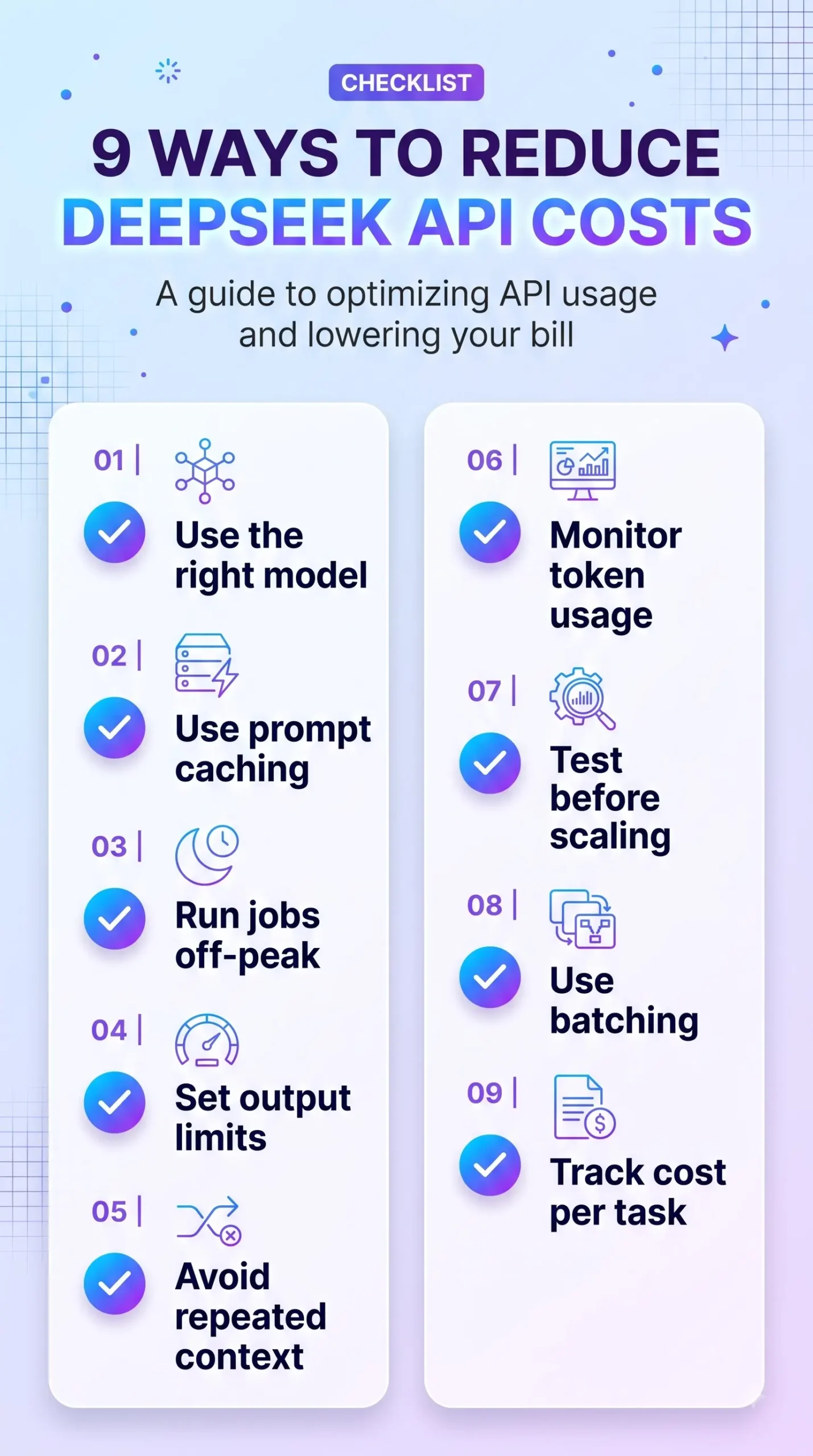
1. Use the right model
Avoid using V4-Pro for tasks that do not need its advanced capabilities. Use V4.1-Flash for chat, summarization, translation, basic coding, data extraction, and content drafting. Use V4-Pro only when the task truly needs deeper reasoning under DeepSeek API pricing.
2. Use prompt caching
Use the same system prompts and repeated instructions wherever possible. Consistency can improve cache hits and reduce input costs under DeepSeek API pricing.
3. Run batch jobs off-peak
Schedule non-urgent jobs during off-peak periods to cut eligible output-token costs by 50%.
4. Set output limits
Prevent unnecessarily lengthy responses by setting a practical maximum output length.
5. Avoid repeated context
Avoid repeatedly sending the same lengthy document or instructions. Use caching or manage previously processed context more efficiently.
6. Monitor token usage
Track input tokens, output tokens, cached tokens, requests per day, and cost per completed task to stay on top of DeepSeek API pricing.
7. Test before scaling
Test on a smaller batch before sending thousands of requests. You can catch errors, refine prompts, and avoid spending tokens unnecessarily.
8. Use batching where possible
Where possible, combine similar tasks rather than sending each one as a separate request, provided batching fits your workflow and API limits.
9. Track cost per task
Total token usage is only part of the picture. Also calculate the cost of completing each task, for example, cost per customer-support ticket, generated article, code review, or data-extraction job, to truly understand DeepSeek API pricing.
12. DeepSeek API Pricing vs Competitors
DeepSeek is still competitively priced, although its price advantage became smaller after the August 2026 increase.
DeepSeek V4-Pro vs Kimi K3
DeepSeek V4-Pro costs $3.96 per million output tokens at peak. Moonshot AI’s Kimi K3 has been reported at around $15 per million output tokens. Based on those figures, DeepSeek V4-Pro is cheaper for output tokens, though a fair comparison should also consider input prices, model capability, caching, and the task being performed.
DeepSeek V4.1-Flash vs V4-Pro
V4.1-Flash is much cheaper for everyday work:
- V4.1-Flash peak output: $1.20 per million tokens
- V4-Pro peak output: $3.96 per million tokens
At peak rates, V4.1-Flash output tokens therefore cost about 70% less than V4-Pro output tokens under DeepSeek API pricing.
Which should you choose?
- For most routine AI work, choose V4.1-Flash.
- Choose V4-Pro when you need complex reasoning or advanced agent workflows.
- Schedule flexible batch jobs for off-peak hours.
- Enable caching for prompts and context that appear repeatedly.
13. Frequently Asked Questions
How much does DeepSeek API cost?
DeepSeek V4.1-Flash costs $0.30 per million cache-miss input tokens and $1.20 per million output tokens during peak hours. Off-peak, it costs $0.15 and $0.60 respectively. V4-Pro costs $1.32 input and $3.96 output at peak; off-peak, it costs $0.66 and $1.98.
What is DeepSeek V4.1-Flash price?
DeepSeek V4.1-Flash costs $0.30 per million cache-miss input tokens and $1.20 per million output tokens during peak hours. Off-peak rates are $0.15 and $0.60 per million tokens.
What is DeepSeek V4-Pro price?
DeepSeek V4-Pro costs $1.32 per million cache-miss input tokens and $3.96 per million output tokens during peak hours. Off-peak rates are $0.66 and $1.98 per million tokens.
What are DeepSeek’s peak hours?
DeepSeek’s peak hours are 01:00–04:00 UTC and 06:00–10:00 UTC, Monday through Friday, excluding Chinese public holidays, according to the schedule provided for this article.
What are DeepSeek’s peak hours in India?
DeepSeek’s peak hours are approximately 6:30 AM–9:30 AM and 11:30 AM–3:30 PM IST, Monday through Friday.
How can I reduce DeepSeek API costs?
Use V4.1-Flash for routine tasks, use caching for repeated prompts, run batch jobs off-peak, set output limits, and monitor token usage regularly.
Is DeepSeek cheaper than ChatGPT?
DeepSeek can be cheaper for many API-based workloads, especially when using V4.1-Flash. However, the best choice depends on your task, required quality, and usage volume. Compare current DeepSeek API pricing for the exact models and token types you plan to use.
Does DeepSeek charge for cached input?
Yes, but cached input is much cheaper than cache-miss input. For V4.1-Flash, cached input costs $0.006 per million tokens at peak and $0.003 off-peak, according to the DeepSeek API pricing figures used in this guide.
14. Final Verdict
DeepSeek API pricing is more flexible than a single flat rate. Your final bill depends on the model you select, the types of tokens processed, cache usage, and the time your request runs.
For many developers, V4.1-Flash is a sensible place to start. It combines solid performance, a large context window, support for text and images, and a much lower price than V4-Pro under DeepSeek API pricing.
Save V4-Pro for complex reasoning, advanced coding agents, and situations where the potential quality improvement is worth the additional cost.
To keep your bill under control, focus on three priorities:
- Use the cheapest model that meets your quality needs.
- Use caching for repeated prompts.
- Run flexible jobs during off-peak hours.
DeepSeek API pricing can still offer good value, but choosing how and when to use the API is increasingly important.
15. Sources
- DeepSeek API Docs — Models and Pricing
- DeepSeek — Introducing DeepSeek-V4.1-Flash
- Reuters — DeepSeek raises API pricing for its V4 models
- Reuters — DeepSeek launches V4 Pro
- Caixin Global — China’s DeepSeek launches smaller, faster AI model
Editorial note: AI pricing can change quickly. Confirm current rates on DeepSeek’s official API pricing page before making purchasing or development decisions.